
Simulation
Phishing tests create realistic behavior signals such as clicks, submissions, reports, and safe decisions.
PhishingBox turns real user behavior into dynamic human risk scores, then connects those scores to phishing defense, security training, email reporting, and targeted action.
of all breaches involve the human element.
Give each target a dynamic score that reflects behavior, exposure, and improvement over time.
Use realistic simulations and reporting signals to understand who needs more support.
Connect risk movement to targeted training, microlearning, and follow-up workflows.
Organizations face increasing pressure to reduce human risk while meeting compliance requirements. PhishingBox brings phishing simulations, security awareness training, email reporting, AI-powered insights, integrations, and API access into one human risk platform.
Traditional awareness reporting can tell you who clicked or who completed training. Human Risk Management connects those events into a living score so security teams can spotlight high-risk users, see who is improving, and understand which departments need more attention. For teams that describe this work as Secure Behavior Management (SBM), the goal is the same: measure behavior, prioritize risk, and guide better decisions.
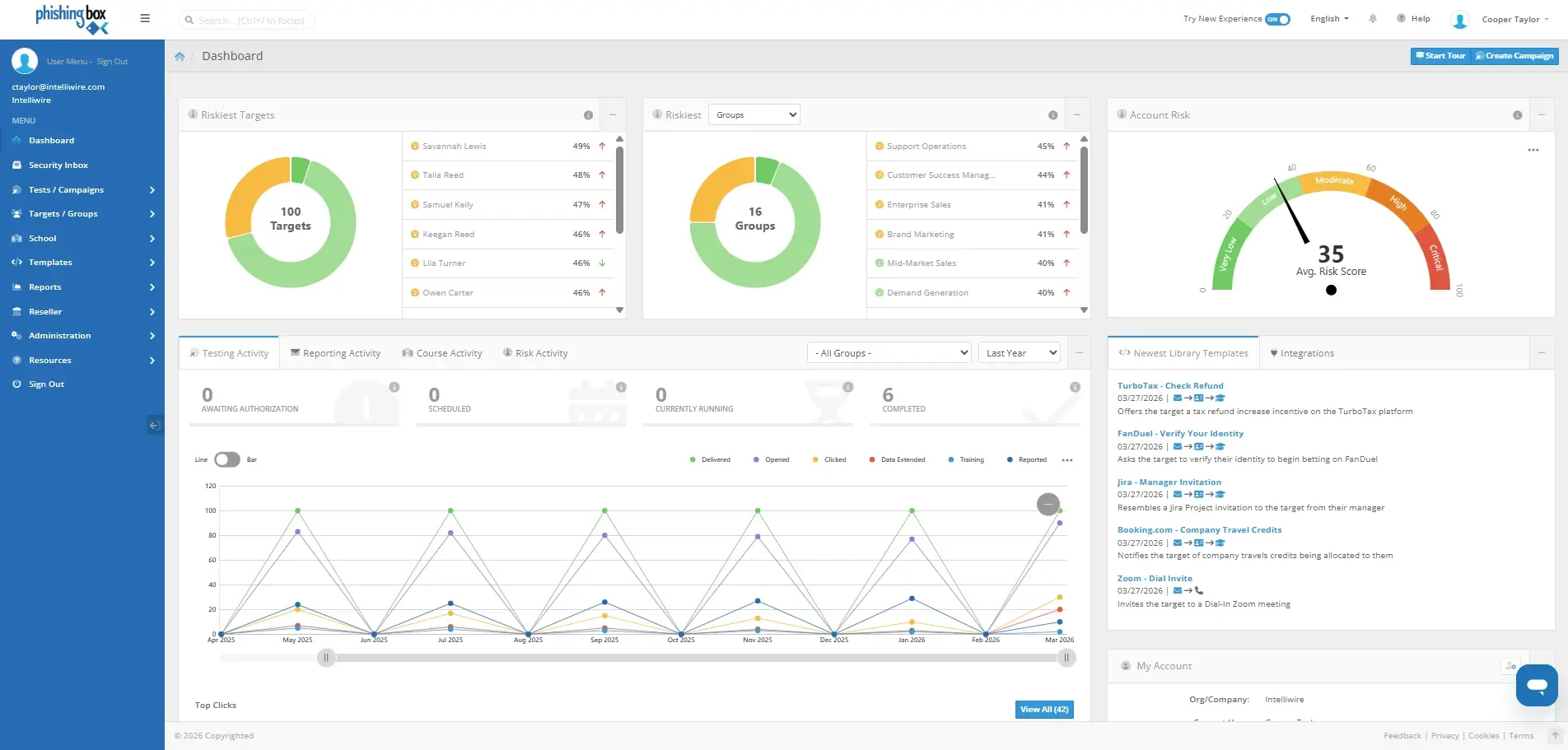
The score is not just a number. It is a feedback loop that helps administrators turn employee behavior into targeted action and measurable improvement.
Phishing tests create realistic behavior signals such as clicks, submissions, reports, and safe decisions.
Signals are weighted and computed into user, group, and account-level risk views.
High-risk users can receive more relevant education, follow-up, and reinforcement.
Scores update as people learn, report suspicious messages, and avoid risky actions.
PhishingBox Risk Score combines available platform signals into a practical risk view. If a package or integration does not provide a specific signal, that input is simply not used.
Clicks, submissions, reports, and other phishing test outcomes help reveal who needs more coaching and who is improving.
Personalized training, course activity, microlearning, and supported third party training data can help show who is improving.
One-click reporting and AI-powered email risk insights can add real-world feedback to the broader human risk picture.
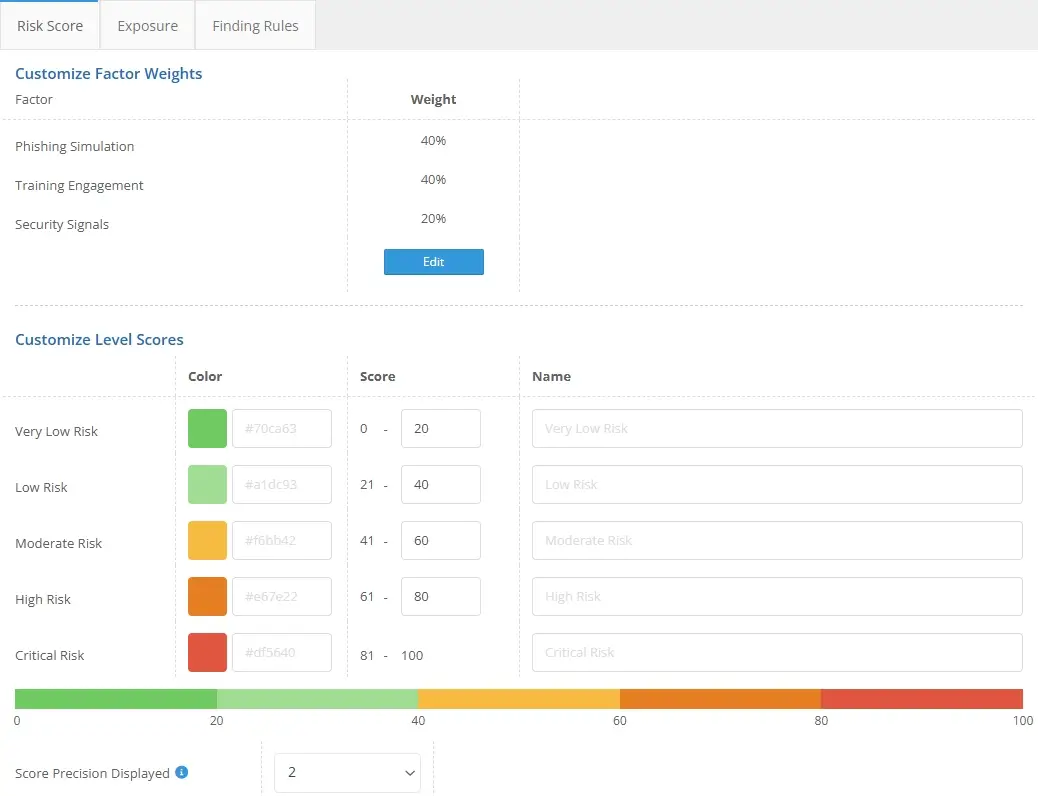
Tune colors, ranges, weighted averages, and how much specific behaviors can increase or reduce a user score.
Filter, sort, and compare targets or departments so teams can prioritize the people and groups that need attention first.
Sync identity, HR, LMS, and security data, then pull risk data into reporting, SIEM, or custom workflows through the API.
These Risk Score views help teams spot high-risk users, compare departments, and understand the details behind each score without leaving the platform.
Risk scoring is configurable, so teams can align the score with their policies and reporting needs. Control color bands, weighted averages, and how much specific outcomes can increase or decrease a user's score.
Define how risk levels appear across dashboards and target views.
Control how different signal categories contribute to the final score.
Set how much events can move risk up or down after user actions.
Use the data available from your package, integrations, and workflows.
Answers to common questions about Risk Score customization, package availability, API access, computation timing, and scoring methodology.
Yes. Risk scoring is customizable, including color ranges, weighted averages, and the amount specific events can move a score up or down. That gives teams room to align the model with their security program, reporting expectations, and internal definition of meaningful risk.
Human Risk Management is included in all packages. The score only uses the data available in your package and connected features, so it will not be skewed by missing inputs. For example, if you do not use PhishingBox School or a supported third-party LMS connection, training data will not be used to evaluate who is improving through education.
Yes. Risk Score data can be accessed through the PhishingBox API. Teams can use that data in custom reporting, executive dashboards, SIEM workflows, client reporting, or other internal security processes.
Scores typically compute within 24 hours or when enough data has been collected to provide a good representation of risk. When certain events happen, the score for a specific user can also be updated independently, so recent behavior can be reflected without waiting for a full account-wide recalculation.
Yes. PhishingBox has a complete thesis on the Risk Score methodology. Please contact your account executive to obtain a copy.
The score can use signals from phishing simulations, training activity, reporting behavior, target and group risk, supported LMS data, and other available platform activity. The model is designed to use the inputs you have available instead of penalizing you for data sources you do not use.
Risk scores are meant to help teams prioritize action. Administrators can spotlight higher-risk users, compare group or department trends, assign more relevant training, and report progress to leadership with a clearer view of behavior change over time.
Yes. Group and department views help administrators understand where risk is concentrated, which teams are improving, and where additional simulations, training, or communication may be useful.